


felix86 26.01
Happy new year! This month we addressed a few nasty bugs.
New logo
Felix86 has a new logo!

For more info about the logo and the artist, visit this page:
https://github.com/felix86-emu/site/wiki/Logo
apt fixes
For a long time apt would be flaky on felix86. Packages would install, but often you would see a Segmentation fault happen after they finish installing, which was unpleasant and confusing.
Since an issue was opened for this, we decided to take a closer look. It turns out it was an issue with how we handle the exit syscall when it is called from inside a signal handler. This would also cause issues in the dash shell, which will longjmp out of the signal handler without ever calling sigreturn, and when it was time to exit the same bug would appear. This is now fixed and apt no longer crashes on exit!
Another bug the issue report mentions is apt-key exiting unexpectedly. The reason for this bug has to do with how we handled config files in felix86. Each child instance would try to access the config.json file to read the configuration. However, if a child process doesn’t have access to the user’s home directory then felix86 will exit during startup. This is fixed by passing configurations to child processes via environment variables.
With these fixes, apt update and apt install can now cleanly install packages on your rootfs:
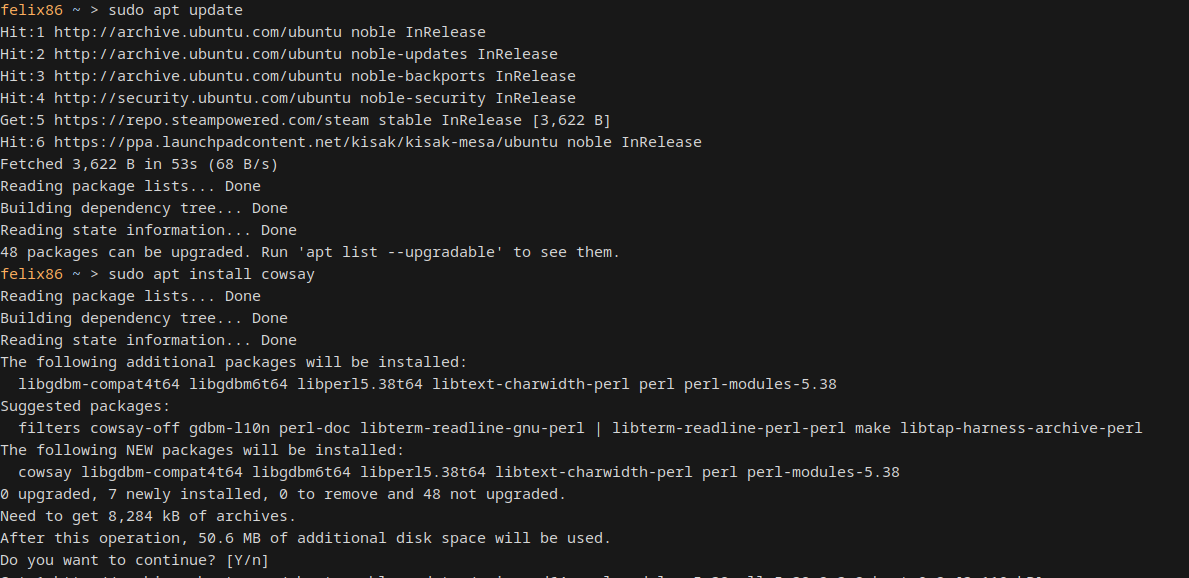 Installing
 cowsay in the rootfs thru felix86
Game fixes
Genshin Impact
Genshin Impact had a couple issues that prevented it from loading. It is not currently playable, as the 2FA messagebox is now a Chromium-based browser which seems to have some issue in felix86 that needs further investigation.
16-bit bswap
Genshin Impact would use the bswap instruction with an operand size override prefix. This is not defined in the Intel manual, but is not an illegal instruction on real hardware. This instruction is now implemented.
Memory usage reduction
Each thread would use significant amounts of memory which did not have a positive impact on performance. One such area was a 2^20 entry address cache, allowing for lookups of recently translated guest addresses using their bottom 20 bits. This was reduced to 2^16 entries, using the bottom 16 bits. Each entry would be 16 bytes, containing a guest and host address pair. Thus, in total, this reduces memory usage by 15 MiB per thread. Additionally, the maximum code cache size was changed from 64 MiB to 32 MiB. The initial code cache size was also decreased from 8 MiB to 4 MiB. This means that applications that spawn a large amount of threads will use significantly less memory, thus starting up faster and not leading to OOM problems.
This change shaves off 2 GiB of memory usage from Genshin Impact.
Deponia
We have a custom allocator for the 32-bit address space that is used for mmap/mremap/munmap/… syscalls. This is necessary even for 64-bit applications, because of the x86-only mmap flag MAP_32BIT. We would previously not correctly mark the executable itself as allocated if it was loaded in the 32-bit address space, which would cause problems because the kernel and the emulator would disagree on allocatable regions.
With this bug fixed, the game Deponia now works.
Execution profiles
felix86 can now load different “execution profiles”, specified by the FELIX86_PROFILE environment variable. Each profile is a partial or full configuration file, which will override the default configuration file. This allows for easily selecting a different array of configurations to do different things. You can have a profile that disables unsafe optimizations, or a profile that enables debugging options.
Additionally, this version introduces a configuration that will pass any specified environment variables to the guest program, separated by a semicolon. For example, FELIX86_ENVIRONMENT=WINEDEBUG=+seh;GALLIUM_HUD=fps will pass WINEDEBUG=+seh and LD_DEBUG to the guest program, without the emulator being affected by these environment variables. This feature allows execution profiles to define certain environment variables.
This feature can be used to automatically apply a bunch of different environment variables and felix86 configurations to games.
REPL color coding
The felix86 REPL can now color code each translation for easily understanding which RISC-V instruction corresponds to which x86 instruction. This can be enabled with the color command.
 Each translation is a different color
Thanks for reading this post.
If you like this project, please give us a star on Github: https://github.com/OFFTKP/felix86