


felix86 25.12
This month we got a lot of work done. Performance improvements, quality of life changes, and a bunch of testing.
Quality of life changes
Trusted directories
In the past, felix86 would only allow you to run applications that exist inside the rootfs. This is because filesystem syscalls are containerized to only allow access inside the rootfs, which is where the x86 libraries and binaries are. This isn’t very user friendly, because it requires copying or moving everything you want to run inside the rootfs. With felix86 25.12, you can run x86 programs outside the rootfs. The first time you do so, felix86 will prompt you whether you want to add that directory to the trusted directories. This will allow felix86 to access this directory and its subdirectories and files without it being inside the rootfs.
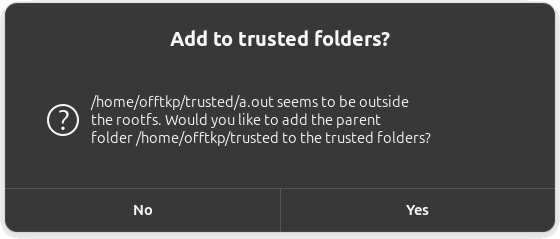 Running an x86 executable from outside the rootfs for the first time
For more info and technical details, refer to the pull request.
Remove felix86-mounter
Previously, an executable with higher privileges called felix86-mounter would be responsible for mounting /dev, /proc and other directories inside the rootfs. Since we introduced fake mounts with trusted directories, these directories are now fake mounted inside the rootfs so there’s no dependency on felix86-mounter. This means that felix86 can now run without any root privileges!
--shell argument
You can now use felix86 --shell to enter the rootfs, similarly to doing felix86 /rootfs/bin/bash but with FELIX86_QUIET set and a nice prompt.
REPL environment
A lot of felix86 work is optimizing the various x86 instructions into an optimal RISC-V instruction pattern. This version of felix86 introduces a REPL environment that allows easily viewing what each x86 instruction translates to.
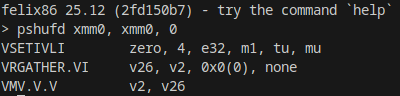 You can also compile instruction sequences by separating them with semicolons!
It allows for viewing how an x86 instruction compiles on 32-bit and 64-bit programs, and you can also disable flag generation. Additionally there’s the option of compiling multiple instruction sequences to view how multiple instructions interact with each other.
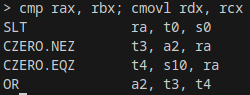 Opcode fusing at work, with
 FELIX86_FUSE_OPCODES=1
BUILD_REPL=1 to enable itEven more optimizations
Scan ahead multiple blocks
The FELIX86_SCAN_AHEAD_MULTI option is now enabled by default. For a refresher on what it does, check the felix86 25.11 post.
It can now work with the FELIX86_UNSAFE_FLAGS option, which makes the recompiler not calculate flags for blocks ending in call or ret. This helps with blocks that have a conditional jump to a ret instruction and a block that overwrites flags. In these cases, the flags don’t need to be calculated as long as the program is ABI conforming. This flag is disabled by default for now, as it may potentially break programs.
Code cache is placed near the executable
Constructing big immediates is a pain in RISC-V and it can take a hard-to-guess number of instructions. Most compilers have multiple paths and may even make multiple attempts at generating the best instruction sequence when loading a big immediate.
One source of big immediates in our case is x86 rip-relative access. We now place the recompiled code cache near the executable, so that most rip-relative addresses can be constructed with an AUIPC+ADDI combo. This only needs to be done for 64-bit programs, as 32-bit programs have smaller addresses that can already be constructed in two instructions.
Instruction optimizations
This version comes with more instruction optimizations, such as optimizing the PMADDWD instruction, BSWAP, 32-bit effective address generation, and more.
TZCNT and LZCNT
The TZCNT behavior matches nicely with RISC-V’s CTZ instruction. When the source operand is 0, TZCNT will set the destination operand to the operand width. RISC-V does the same with CTZ and CTZW, so translation is now 1-to-1 (excluding flags). Previously we would use a branch to check if the source operand is zero, but this is unnecessary.
TZCNT can also operate on 16-bit operands. There’s no CTZH instruction, but only two instructions are needed to emulate it. One is a BSETI to set the 16th bit, followed by a CTZW. This way if the low 16 bits of the source are zero, the CTZW will return 16 since the 16th bit is set.
LZCNT was optimized in a similar fashion using CLZ and CLZW.
Requirement upgrade
The felix86 requirements used to be rv64gv, with RVV 1.0. As we get closer to RVA23 compatible chips hitting the market, this requirement is upped to rv64gvb, where b is Zba/Zbb/Zbc/Zbs. It is highly unlikely we’ll get any new high-performance cores that have RVV 1.0 but no bit-manipulation instructions, so this is a pretty easy requirement.
Other improvements
The felix86 install script has been improved. It is now hosted at install.felix86.com and its source code can be found at https://github.com/felix86-emu/install.
Rootfs
New rootfs options are now available. You can choose the No Wine rootfs, which saves ~1.6 GiB of space by not having wine installed, in case you don’t need to run Windows apps. There’s also the Tiny rootfs, which has just the bare minimum, weighing in at ~150 MiB uncompressed.
There’s plans for a future version of felix86 that allows running without a rootfs. This would require you to manually install the x86 libraries yourself and set LD_LIBRARY_PATH accordingly. It would also give the emulated executable unrestricted access to your filesystem.
Testing
Our CI was extended with a bunch of new tests. These will verify correctness and massively help with catching regressions.
Currently we use prebuilt tests from GCC, Valgrind and libuv. In the future, we want to expand the testing infrastructure with tests from Gvisor, POSIX, Node, Chromium, and more.
Benchmarks
We ran GeekBench 6 with felix86 25.11 and felix86 25.12. This month’s version is around 6% faster, with some benchmarks being up to ~20% faster. Here is the full benchmark comparison. Keep in mind that benchmarks are not really indicative of gaming performance, however it is nice to see that our performance is improving each month.
Thanks for reading this post. See you in 2026!
If you want to support this project, please consider donating: https://ko-fi.com/felix86
If you like this project, please give us a star on Github: https://github.com/OFFTKP/felix86